Plans, checkout, and subscription operations
Build a credit-backed catalog, connect one or more supported gateways, and verify the complete lifecycle before accepting production money.
A successful redirect is not proof of payment. Audoryx activates purchases only after it receives and verifies the provider's canonical webhook event.
License prerequisite
The marketplace is available to valid Regular and Extended licenses. Running Audoryx as a paid multi-user service, however, requires the SaaS/commercial capabilities granted by a verified Extended purchase. The Licenses page shows the certificate type and exposes the upgrade workflow when an eligible purchase exists.
Do not bypass a capability gate in source code. Synchronize the license, confirm the bound origin, and follow the purchase terms shown in Codester and EKR.
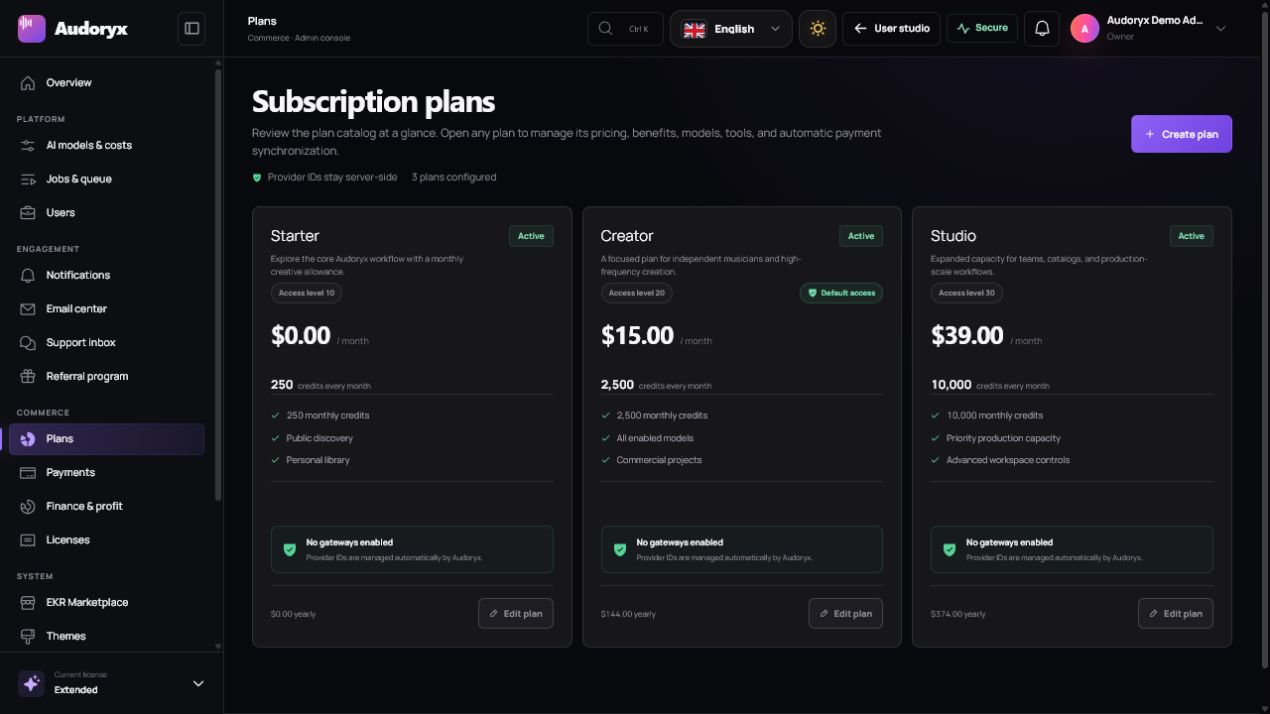
Create subscription plans
- Define the offer. Open Admin → Plans, create a clear name and description, and choose the billing interval.
- Price deliberately. Enter amount and currency, then account for gateway fees, tax obligations, provider costs, refunds, and support.
- Allocate credits. Grant a sustainable number of generation credits and document whether unused credits expire or carry over.
- Choose access. Select the models and creator tools included in the plan. Hidden or disabled models cannot be restored by the plan.
- Map provider products. Add the correct sandbox and production catalog identifiers required by each enabled gateway.
- Publish after testing. Keep the plan inactive until checkout, webhook activation, renewal, cancellation, and invoice access pass end to end.
| Field | Purpose | Verification |
|---|---|---|
| Price and currency | Customer-facing recurring amount | Matches the gateway catalog exactly |
| Credits | Wallet grant for each successful cycle | Ledger entry is issued once per canonical payment |
| Model access | Models a subscriber may select | Checked server-side before a job is created |
| Gateway IDs | External product, price, or variant mapping | Separate sandbox and live values are tested |
Payment gateways
Audoryx exposes adapters for Stripe, PayPal, Paddle, Razorpay, Paystack, Flutterwave, Lemon Squeezy, Square, Mercado Pago, and Mollie. Availability depends on your country, provider account, currency, and installed release.
- Copy credentials only from the provider's official dashboard and store them through Audoryx's encrypted settings form.
- Use the exact HTTPS webhook URL displayed in the gateway panel. Do not append or remove a path segment.
- Select test mode before using sandbox values; never mix sandbox catalog IDs with live credentials.
- Configure signing secrets independently from API keys where the gateway issues both.
- Complete the provider's business, tax, identity, and payout onboarding before launch.
Exact credential names, webhook events, redirect behavior, and test cases are preserved in the payment engineering guide.
Checkout and webhook lifecycle
- Checkout starts. Audoryx creates a pending local purchase and a provider checkout session.
- The provider collects payment. Card or wallet details remain on the provider-hosted surface where supported.
- The browser returns. The success page reports that confirmation is pending; it does not mint credits.
- The webhook arrives. Audoryx verifies signature, event type, amount, currency, customer, and canonical resource state.
- State is committed once. An idempotency key prevents duplicate subscription activation or duplicate credits.
- The account refreshes. The creator sees the authoritative subscription and ledger state.
Minimum webhook test
- A valid paid event activates the expected plan and grants exactly one credit ledger entry.
- Replaying the same event changes neither balance nor subscription count.
- An invalid signature, wrong amount, wrong currency, or unknown customer is rejected.
- A delayed webhook can reconcile a purchase after the browser session has closed.
Cancellation, renewal, and refund
Treat the payment provider as the canonical authority for billing state. A creator's cancellation request should update the provider first, then synchronize the resulting end-of-period or immediate status into Audoryx.
| Event | Expected local behavior |
|---|---|
| Renewal paid | Advance the billing period and issue the configured cycle credit once. |
| Payment failed | Record the provider state and follow its retry/dunning lifecycle without inventing a successful charge. |
| Cancel at period end | Retain access until the verified period end, then apply the configured downgrade behavior. |
| Refund or reversal | Record the canonical event, adjust entitlements according to policy, and preserve an auditable ledger. |
Finance and reconciliation
Use Admin → Payments for transaction-level investigation and Admin → Finance & profit for aggregated revenue, provider cost, and margin signals. Exported reports support reconciliation but do not replace provider statements or regulated accounting records.
- Compare successful provider charges to local completed transactions by stable external identifier.
- Investigate currency, amount, tax, fee, and refund differences before closing a period.
- Restrict financial administration to trusted roles and redact personal data from support material.